
In short
- MarginNote made the excerpt, mind map and flashcard workflow popular, but it runs only on Apple devices.
- Lattio follows the same workflow in a web app and in desktop apps for macOS and Windows.
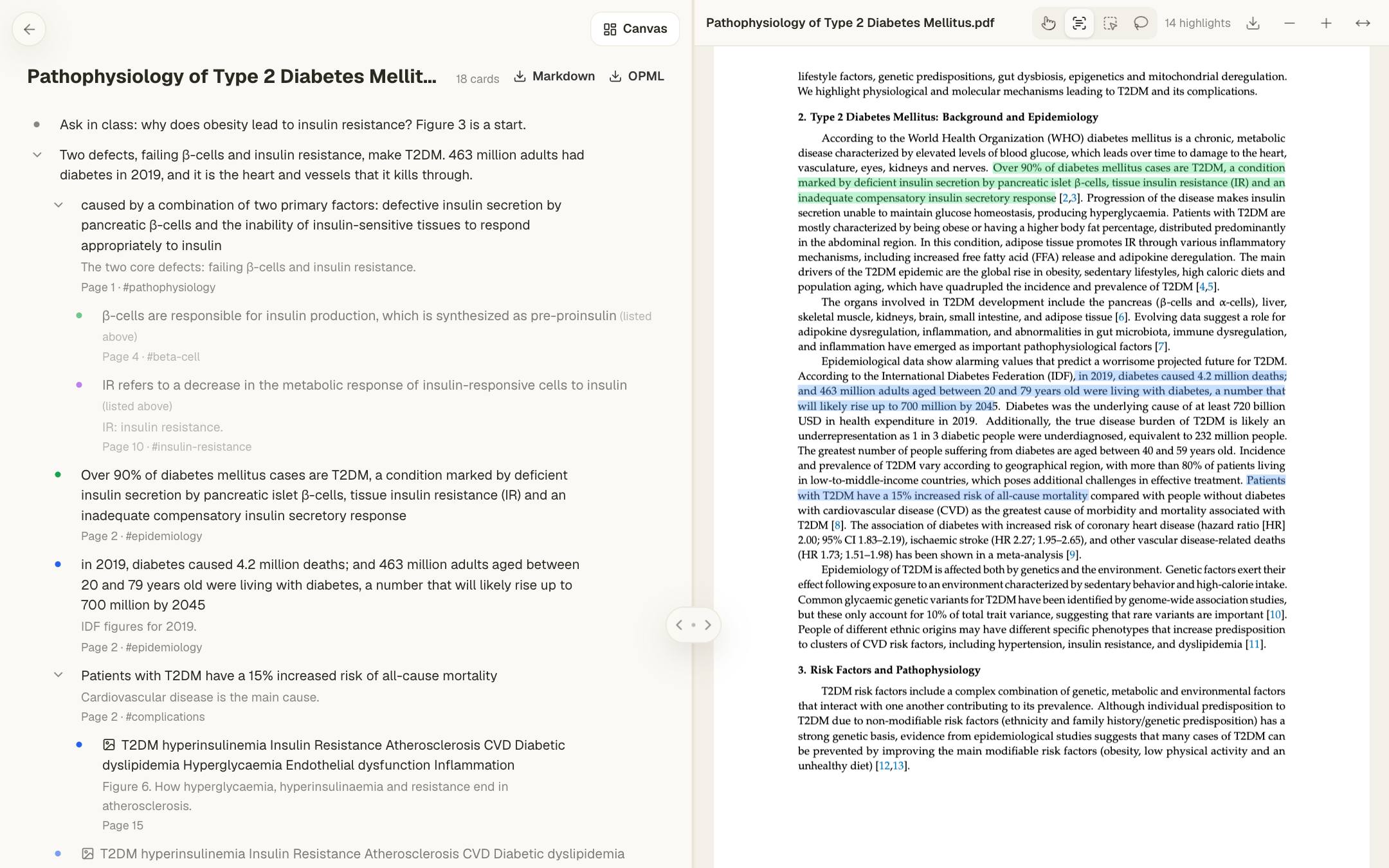
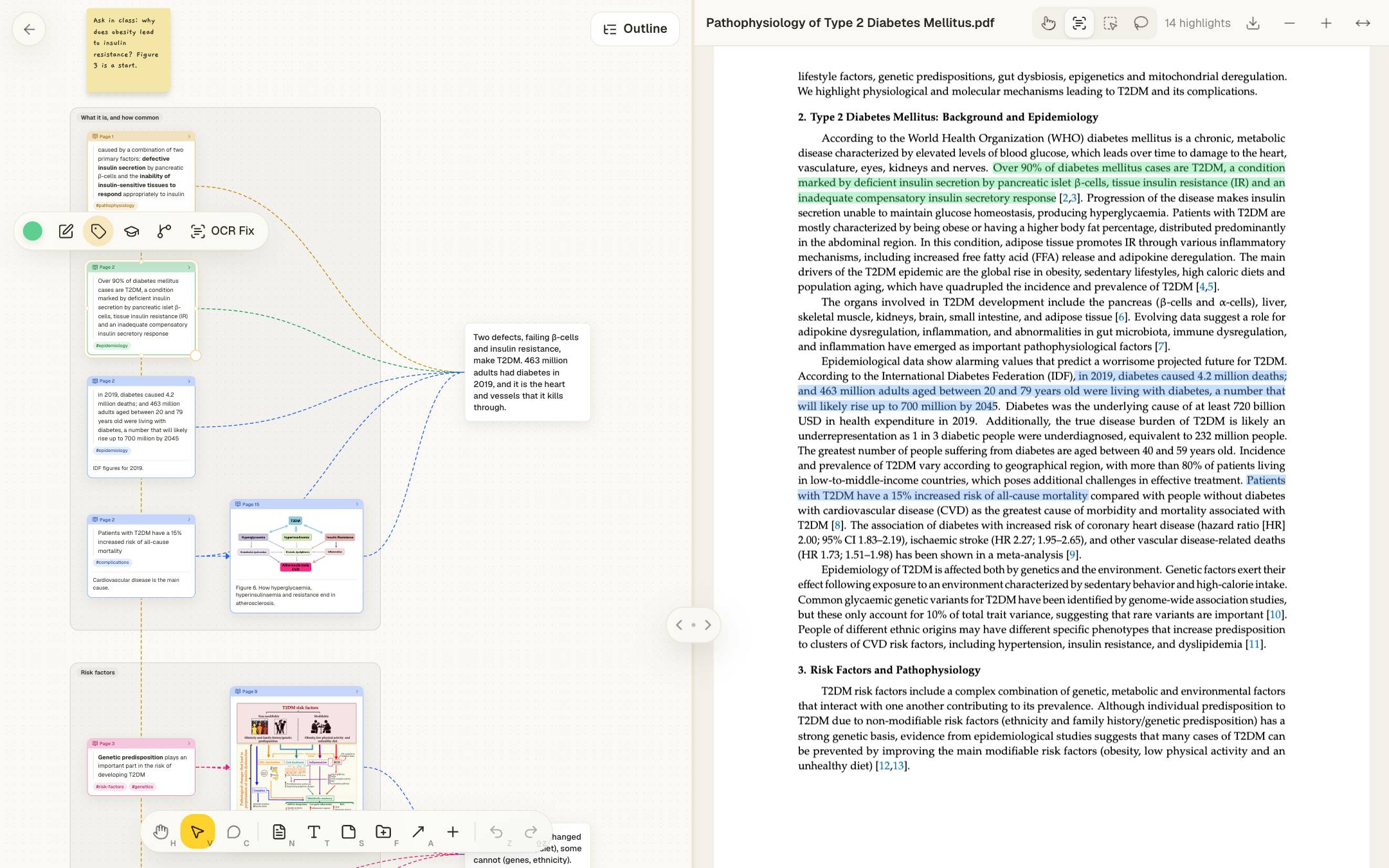
- Highlights become excerpt cards on an infinite canvas, which Auto layout turns into a mind map and the outline view into a tree.
- Your PDFs and notes stay on your device; an account and cloud sync are optional.
Who looks for a MarginNote alternative?
MarginNote is a reader for iPad, iPhone and Mac that turns what you highlight into a mind map, an outline and flashcards. People who like that way of studying often need it somewhere MarginNote doesn’t run: a Windows laptop, a university computer, or a browser. Others want their excerpts on an open canvas next to notes, images and other papers, rather than in one book’s map.
Lattio was built for that workflow. It is not affiliated with MarginNote, and it doesn’t open MarginNote files; you bring your PDFs and EPUBs and study them again.
Excerpts, mind maps and review, in Lattio
- Read beside your notes. Study mode opens a PDF, EPUB, web article or video on the right and its notes canvas on the left.
- Highlights become excerpt cards that jump back to their page. Rectangles and lassos cut figures, tables and formulas out of the page.
- Mind map and outline. Drag excerpts onto each other to build branches, add summaries and groups, and let Auto layout draw the map. The outline view reads it as a tree.
- Review. Marked words become blanks on recall cards, scheduled by spaced repetition. Pro adds progress charts and export to Anki.
What’s different in Lattio
| MarginNote | Lattio | |
|---|---|---|
| Platforms | iPad, iPhone, Mac | Web, macOS, Windows |
| Install | App Store | Nothing to install in the browser; desktop apps to download |
In Lattio your excerpts are cards on an infinite canvas, laid out as a mind map when you want one. Next to them you can put notes, sticky notes, images, links, folders and other papers, and a folder can hold a whole course or project.
Lattio is younger, and MarginNote has tools Lattio doesn’t. If you study only on an iPad, MarginNote may suit you better. If you work across Windows, Mac and the browser, or want your reading on the same canvas as the rest of your notes, try Lattio: no account is needed.
Getting started
The web app needs nothing installed; the desktop app works offline on macOS and Windows.
Study mode opens, with a notes canvas made for that PDF.
The PDF to mind map guide walks through it, and the demo video shows it in a minute.
Frequently asked questions
Is there a MarginNote for Windows?
MarginNote runs on Apple devices. Lattio offers the same excerpt, mind map and review workflow on Windows, on macOS and in any modern browser.
Can Lattio import my MarginNote notebooks?
No. Lattio doesn’t read MarginNote’s files. Bring your PDFs and EPUBs and study them in Lattio; Markdown notes can be imported, and Kindle or Readwise highlights too.
Is Lattio free?
Yes. Reading, highlighting, excerpt cards, mind maps and review are free, with five things in study across your spaces. Pro adds unlimited study, text recognition for scans, search inside PDFs, Anki export and more cloud storage.
Does Lattio work offline?
Yes. Notes and PDFs are stored on your device, and the desktop app works without a connection. Cloud sync is optional.
Start thinking spatially with Lattio
Notes, PDFs, and ideas on an infinite canvas. Free, offline-first, and stored right on your computer.